
Get started
- Choose your front chainrings and rear cassette from the lists.
- Select the tyre size printed on your tyre.
- Read the results—they update automatically.
- Switch on “Compare another setup” to try a second combination.
Simple and Expert views
Simple view keeps the main inputs and activity results together. Turn on Expert view to open manual tooth counts, measured wheel size, speed settings, the gear chart and every results table. Switching views keeps your values.
Match the cassette model code, number of speeds and tooth range to the bike’s specification. Several named models can give the same gearing. GRX, for example, is a groupset name: look for the cassette’s own CS- model code. Choosing a preset fills tooth counts; it does not confirm component compatibility.
Entering your own tooth counts
Open “Edit tooth counts” if your setup is not in the lists. Choose the number of front rings and rear cogs, then enter their tooth counts. Enter rear cogs from smallest to largest. Two digits move you to the next box; use Tab or Enter after a one-digit value.
Front and rear presets work separately. Changing the cassette keeps your front chainrings. Check the selected counts against your bike.
What should I enter?
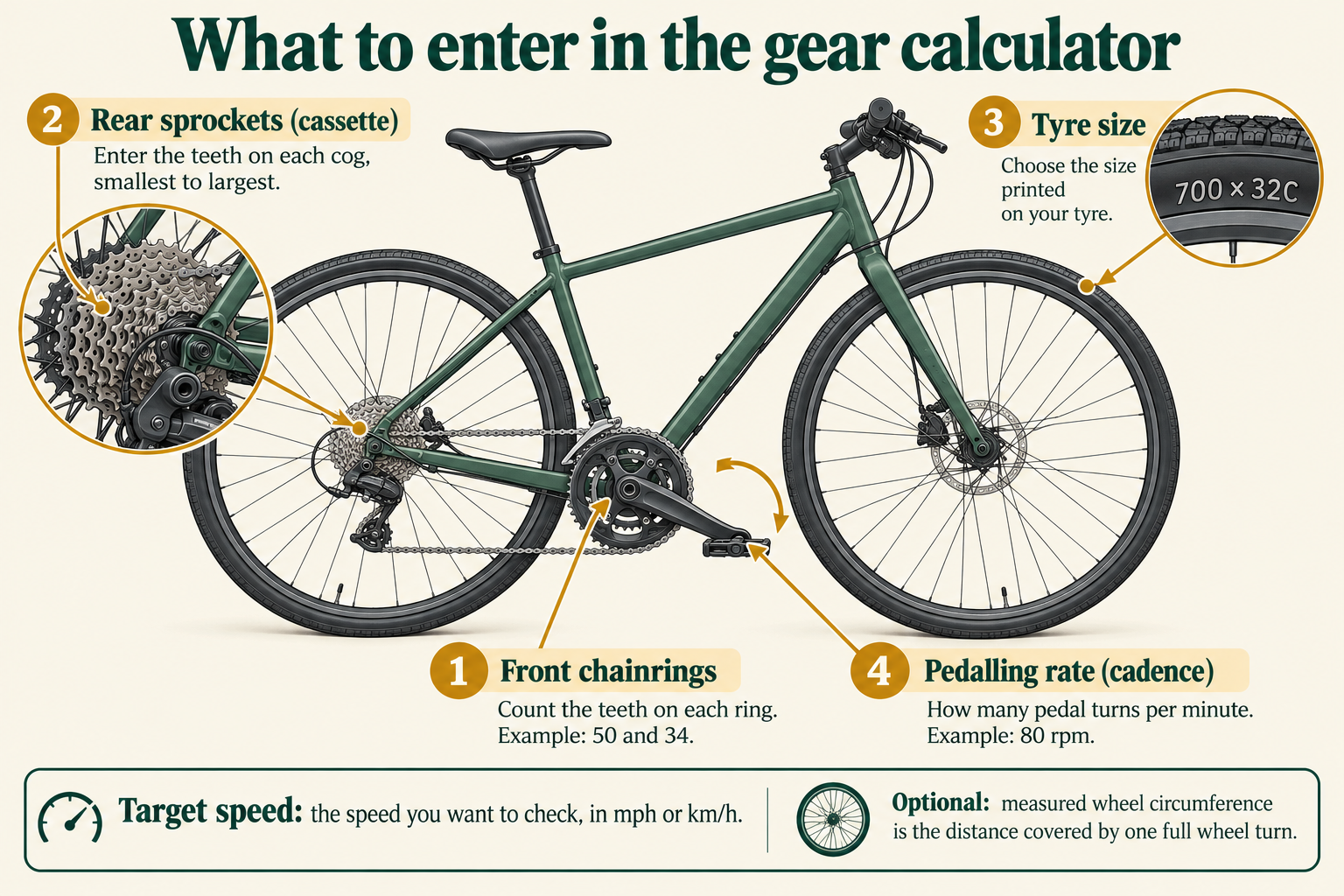
- Chainrings: the toothed rings beside your pedals. A 50/34 double has two rings: choose two and enter 50 and 34 in separate boxes.
- Cassette: the group of rear sprockets. Check the markings or manufacturer specification for their tooth counts. “11-speed” describes the number of sprockets, not their teeth.
- Wheel rim diameter: choose a familiar tyre size from the dropdown, or select Custom tyre size and use the second number in the tyre’s ETRTO marking (its standard size), such as 32-622. Common diameters are 622 for 700C/29-inch, 584 for 650B/27.5-inch and 559 for many 26-inch wheels.
- Tyre width: the first number in 32-622 is 32 mm. Actual tyre height varies, so the calculated circumference is an estimate.
- Measured circumference: for a better speed estimate, measure one complete wheel revolution along the ground with the rider’s weight on the bike. This overrides the rim/tyre estimate.
Reading your results
A smaller lowest-gear number means lower gearing: you travel less distance per turn of the pedals. With the same wheels, a 34-tooth chainring and 34-tooth rear sprocket give a 1.00 ratio. Moving to a 40-tooth rear sprocket gives 0.85—a 15% reduction. At the same speed you would pedal about 17.6% faster. This does not mean a climb requires 15% less total energy.
Gear inches express gearing using the effective wheel diameter. Development means metres travelled per complete pedal revolution. These measurements allow meaningful comparisons between different wheel sizes. The speed shown is the speed your gearing produces at the entered cadence, not a prediction of how fast you can ride.
Before changing parts
The figures do not confirm that a cassette fits your bike. Check derailleur (rear gear mechanism) maximum sprocket size and total capacity, chain length, cassette/freehub fit, shifter compatibility and manufacturer instructions. The full chart includes mathematical combinations, including gears you may avoid because they put the chain at an excessive angle.
How the calculator works
Ratio = front teeth ÷ rear teeth. Estimated wheel diameter = rim diameter + twice tyre width. Circumference = π × diameter, unless you supply a measured circumference. Development = circumference × ratio. Speed in km/h = development in metres × cadence × 60 ÷ 1,000. Gear inches = circumference ÷ π ÷ 25.4 × ratio.
Understand gearing systems · Cycling jargon explained · Plan a touring trip
Speed settings
Leave the example settings alone if you only want to compare gearing. Cadence is how many full pedal turns you make per minute. The example uses 80. Target speed lets you check how quickly you would need to pedal at a chosen riding speed. Switching between mph and km/h converts the target speed too.
The activity ratings
Strong, Moderate and Limited describe gearing reserve for each activity. They are editorial guides based on the lowest and highest gears, not ratings of the whole bicycle. Motor assistance can make e-bike riding easier; the calculator compares the gears themselves.
Saving and exporting
Open “Save, restore or export your gearing” below the calculator. Browser saves stay on this device. Download a JSON plan for a portable backup; import it to restore your inputs, Expert view and chart selection. Excel and PDF are snapshots, not reloadable or recalculating plans. The PDF includes the selected chart; the Excel workbook includes the full numerical tables and overlap/cadence flags.
Method and limits
This version covers derailleur and single-speed gearing. Internal gear hubs and gearboxes need their internal ratios, which are not modelled here.
Wheel size is estimated from the selected tyre unless you enter a measured circumference. Fitness, luggage, gradients, grip and motor assistance affect riding too. Check component compatibility before buying parts.
How the ratings are chosen
Unusual-gearing flags: lowest gear below 15 or above 60 gear inches; highest gear below 40 or above 150. These are broad editorial flags, not engineering limits. Activity guidance uses the lowest gear including wheel size. Our broad bands are up to 20, above 20 to 25, above 25 to 30, above 30 to 35, and above 35 gear inches. Lower bands offer more reserve for slow loaded climbing; higher bands need more caution for hilly touring. These boundaries are editorial aids, not agreed activity standards. Very steep loaded trails may call for roughly 20 gear inches or less, but route, rider and load can change the requirement. Top gear: 100 gear inches or more is generous high gearing; 80 to under 100 is moderate; under 80 is lower. Rear spacing uses the largest adjacent tooth-count jump: up to 15% closely spaced, above 15% to 22% mixed, above 22% larger jumps. These are our broad comparison bands, not universal cycling standards. Enter every sprocket for meaningful spacing results.
Using the charts on your phone
Tap a cog to see its figures. Cogs sit on staggered rows to give each one room; their position from left to right still shows the gearing. Each front chainring has its own panel.
In a full results table, use Show columns to choose gear inches, speed and cadence, or gain ratio and development. Choose All columns to swipe across the complete table. The front/rear gear column stays visible. Excel and printed reports include the full table.
Reader comments
Share your gearing setup or ask a question. Please follow our discussion rules.